
This kit will enable you to create the "calling cards". PLEASE NOTE: ALL IMIAGES ARE IN BITMAP BECAUSE THAT IS A FORMAT THAT MOST ANY DRAWING PROGRAM WILL WORK WITH. HOWEVER; IT IS A VERY LARGE FILE SO AFTER YOU HAVE MADE THE IMAGE, CONVERT IT TO A JPEG (.JPG),OR, IF YOU ARE GOING TO CREATE AN ANIMATED ONE, A GIF (gif), BEFORE YOU PUT IT, OR ANY IMAGE, ANYWHERE ON THE WEB SO IT WILL NOT TAKE UP A WHOLE LOT OF SOMEONE ELSE'S SPACE: THANK YOU. At 651 x 150 px, it is sized to be noticeable, but not eat up tons of space and the pink wrinkled-satin background is very feminine so it is perfect as a thank-you note, a happy-birthday note or a thank you for visiting, with enough room to write a short personalized message. This kit contains materials for any skill level from basic to fairly advanced, including animated and alternative backgrounds for scratch built left sides and the software with which to do them
CONTENTS:
1 folder of images that has a bonus of 3 mp3 audios of pretty music for Little Girls
2 fonts folder with pretty or cute fonts for girls
3 paint XP. A version of XP's paint that works almost anywhere that will provide a modicom of useful drawing and cut/paste functions
4 IrfanView and plugins: A program that will do a good deal of image editing, such as join images at the left, right, top or bottom, which is needed here. The Plugins will find their way to the IrfanView folder when Setup is used. So run the IrfanView setup first
5 unFREEz. a gif animator
6 a folder of pre-sized satin textured bacgrounds that should be 200 x 150 that can be used to create left-side parts, this includes the pink that is used in the provided images. These are used with a copy/paste or with IrfanView's overlay set to center and selecting an apprpriately sized foreground image
7 a set of FairyScrpt illumited monogram Initials in folder FairyWrite. As you become more advanced, you may wish to use this to hold border trim and things like that
GETTING STARTED (This is, or should be, a do-once process):
1 Put this whole thing where you wish
2 Unzip
3 Copy the fonts in your font folder
4 Use the IrfanView, plugns, and unFREEZe setups and check for updates and install Paint XP to the Program Files x86 folder. TIP, to have these programs ready to go wherever you are, pin them to your taskbar quick lanuch
5 Go into the images folder and bring out znametag.bmp: Now would be a good time to put a signature in so that you need not do that each time you make one of these cards
6 If you are practiced, you can run the text editor in the paint program and put your name in so that if you use more than one, like first and middle, you can separate them far enough from the border and each other so that you can begin the text of your names with the second letter and paste in the first letters using the FairyWrite mongrams. It would be a good idea to save this with "Save as" and a number after the "g" in "znametag" so that you do not change znametag.bmp itself (you may wish to use it again at some later time) and you can do it over if you wish until you get it just right or you may just want to have several. It is also possible you may wish to put trim around the edges of the message section
7 When you have it just the way you want it, take that copy and put it back in images
TO USE:
I,reference IrfanView because that is the image editor that I am familiar with that has this capability
1. (Using IrfanView) go to your version of znametag.bmp, which should be the very last file in the images folder, and bring it up
2. Put the pointer on it, right click and click on "Copy" then exit
3. Bring up the images in your viewer-editor and go through them until you find one you would like to use
4. (In IrfanView) Edit>Paste special>To Right. The nametag will appear attached the right of the image like so
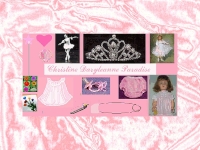 +
+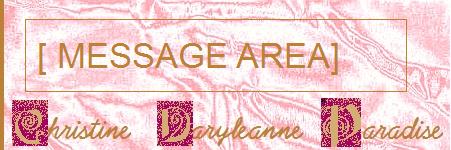 =
=
GET PICPAK: An assortmen of images from RUFFLES & RIBBONS GIRLS' HOME that you may wish to use to decorate your own Timeline wall by inserting them into the "staus update". They are not large, but you may have to resize some of them. BE SURE TO CONVERT THEM FROM BITMPAS! BITMAPS TAKE UP VERY MUCH SPACE